
We envisioned Ideyatech to be an agile, creative and pro-active software development company. We never intended to become like any other outsourcing company that provides cheap developers and cookie cutters. To differentiate our company from the rest, we redefined the developer titles and roles.

We classified our developers into three: Codester, Codesmith and Codemaster. However, it’s more than just the making new titles… we also redefined their roles.

Codester
A codester is a dynamic individual who has passion for abstract and logical reasoning. He is trained in the art of programming and is experienced in the Java language. He is resourceful and capable of learning new technologies on his own. Codester are people you can rely on to deliver codes that work according to specifications.

Codesmith
A codesmith crafts their codes with artistic mastery. He is capable of writing clean, well-designed codes. He is well-versed in the art of programming and ensures that his codes are optimized, refactored and properly unit-tested. Codesmiths are your best bet in doing complex and more advanced transactional web applications.

Codemaster
A codemaster is one of the chosen few who can design unique solutions to common complex problems. Unlike traditional developers, he thinks of solutions with a business sense. In addition, he is an expert in design patterns - not only in theory, but also in practice. Codemasters are the perfect partners for product development since they have the creative insight and technical proficiency in developing state-of-the-art applications.

For the past two months, we have been having our weekly T3 (Tuesday Tech Talk) sessions. It’s a 30-minute discussion about any technical topic the presenter would like to discuss. Presenters are randomly selected from the development group.

So far, we have received nothing but benefits from this activity. Here are some of its benefits and advantages:

  1. The presenters get an opportunity to talk, express themselves and practice their presentation skills. More importantly, they steer away from the developer mindset for a while, get out of their shells, and think of good topics to discuss.
  2. The attendees learn something new. Everybody seems to know something others don’t.
  3. Everyone begins to understand the specialization and span of knowledge of their colleagues. In this way, it becomes easier to know who to ask regarding particular topics. Subsequently, the developers become experts and specialists in their own way.
  4. This builds camaraderie within the team. Everyone relaxes and opens up their minds for new knowledge.
  5. The topics discussed are usually not something we do or use in our daily routine at work. So, everyone gets to learn more than the usual stuff.
  6. Everyone realizes the things that they do not know and starts to seek for more information about it.
  7. The organization strengthens its corporate IQ as people share their ideas and knowledge with each other.
  8. After a couple of sessions, everyone began appreciating the activity and now looks forward for new things to learn.
Here are some of the topics we have discussed so far:
  • Tips on improving website performance (as recommended by Yahoo Exceptional Performance)
  • Programing with Grails
  • Reverse Ajax via DWR
  • jMaki
  • Integration testing with TestNG
  • Image Manipulation / Photo retouching
  • Javascript Programming
In the end, I believe the concept of T3 sessions is very much aligned with our core values - Leadership, Execution, Agility and Passion.

We’ve been using Continuum for quite some time now. While Continuum does seem to do a good job managing our builds, its limited support for JUnit Test reports made us evaluate an alternative, Hudson. Hudson is the new guy on the block, aside from cool icons and more intuitive interface, this tool seems to be quite competitive and feature-packed.

So, I’m listing down a head-to-head comparison between Continuum and Hudson as we’ve used them and based on features we are looking for:

Build Management:

Continuum seems to perform better in this area. It allows multiple jobs/script configured on a single project. Projects can also be logically grouped. Hudson only supports one job per workspace, which I find very limiting. This means that if we need 3 jobs (e.g. build-war, deploy, run-test), each job needs its own workspace, which doesn’t make sense because all these job share the same source code.

User Management:

I prefer Hudson a little over Continuum because I like simplicity over flexibility. Considering our small team size, there is no point of grouping people with several permissions across multiple projects. All we need is the ability to restrict the developer’s access within their projects. Hudson has a simple, easy-to-use permission system–I was able to setup user access rights within 30 minutes. Continuum seems to be a little over-complicated on this. Continuum also has a strict password policy which makes it more difficult to manage.

Scheduling:

Once again, Hudson is better due to its simplicity. To configure a schedule, simply add “@daily” on schedule option and you’re all set. While Continuum’s scheduling isn’t complex, there’s more clicking involved. Again, Simplicity over Flexibility.

Email Alerts/Notification:

Although both tools provide email support, Hudson has a more detailed email report. Hudson allows the tracking of JUnit test reports for every test, while Continuum only provides notifications on failed or successful builds.

In the end, we decided to switch to Hudson because it is easier to use and it includes the Junit test reporting feature.

Note: The Continuum and Hudson logos are properties of Apache Continuum and Hudson, respectively.

How do stand-up meetings help? Are they really helpful?

stand up meetings

Here at Ideyatech, we have been practicing stand-up meetings religiously ever since our first project. So far, this short, daily routine has kept everyone up-to-date on status of their projects. By reporting daily activities, issues and bottlenecks are quickly identified and resolved. Everyone gets accountability on the tasks that are reported, and the team becomes more responsible of the project as a whole.

Here are some tips to make stand-up meetings effective:

  1. Be religious. Make it a daily habit.
  2. Keep it short. Do not exceed 15 minutes.
  3. Avoid autocracy. Let team members take responsibility and accountability.
  4. Break long conversations. Take it offline and discuss after the meeting.
  5. Use a small object as a token indicator of the current speaker. We use a ball, which occasionally brings some fun during meetings.

In addition, here are some common problems we encountered during our stand-up meetings:

  1. Some members (especially the younger ones) tend to report to the project leader, instead of reporting to the team.
  2. Some members wait for the stand-up meetings before bringing up their questions or issues.
  3. Most of the time, the members report only their accomplishments, and tend to forget about the problems or their pending or next tasks.

At the end of the day, these stand-up meetings serve as a medium for communication between project members. For best results from these stand-up meetings, some procedures may need to be applied and laid out.

As defined in Wikipedia:

Agile Software Development is a conceptual framework for software development that promotes development iterations, open collaboration, and adaptability throughout the life-cycle of the project.

True to its meaning, Agile is a concept that can be implemented in several ways. So, there is no correct way of getting it right… Nevertheless, here are some tips we’d like to share based on our experience:

Ideyatech agile

  1. Agile team members must be matured and responsible. Team members must be pro-active and have the drive/determination to take charge of the task at hand. Self-organizing teams are hard to develop, especially for junior programmers. It takes some level of maturity and experience for a team member to identify the tasks and execute them.
  2. Agile projects must be contracted as “Time and Material” rather than as “Fix Cost”. This is because agile practice is susceptible to “scope creeps”. The concept of being able to adjust/change requirements during each release indicates that scope must be flexible. As such, contracting on “fix cost” will either limit scope changes or lead to tedious change control processes.
  3. Pair programming should be limited. It is effective only on certain circumstance such as “master-apprentice” pairing or critical components. Otherwise, it will lead to inefficiency where two people are producing half the value of their time.
  4. Tools are essential for unit testing and continuous integration. It is almost impossible to implement unit tests and continuous integration without the proper tools to support the build and test process. It is important that the tool is able to run builds on pre-determined schedules and send configurable alerts. Moreover, choose a tool that can understand the unit test results and do notifications as necessary.
  5. Take the Agile Manifesto with a grain of salt. Not everything in Agile works… it varies on the organization, software and project type. For organizations that are new to this concept, start by shortening your iteration release - at least to monthly. This can take you a long way going agile…

We now have a new home - bigger and bolder. We moved to our new office space last weekend. The move was fun, but painful…

Our new space houses all the facilities we need, such as workstations and meeting rooms. Everything is perfect… well.. almost… Our Internet provider did not deliver their promise of weekend-line transfer. Instead, we had to wait for three working days to get the line transferred. As contingency, we tried asking another vendor for a new line. But, guess what? Both vendors installed their lines at the same time - three days after. Having a “work-from-home” policy saved the company since most of our developers have Internet connections at home or have access to wi-fi hot spots.

Now, for the fun part…

ideyatech - where ideas and technologies meet.

It’s clear from our tagline where the name comes from - idea and technology. Idea is formally defined as “a thought or suggestion as to a possible course of action; an opinion or belief” while technology is “the application of scientific knowledge for practical purposes”. When combined, these two words synergize to build a stronger meaning - “to revolutionize an industry through technology by executing brilliant ideas.”. It’s a dream many of us wanted to achieve, but only few dare to take the challenge… and we are one of them - ready to take the challenge.

Now, what’s with the ‘y’? Well, ideya is the Filipino translation of idea. A part from being bold and revolutionary, we wanted to be known as a Filipino company - founded, managed and executed the Filipino way. We are here to be a living proof that the Filipinos can compete globally and surpass technologies from more advanced countries. We believe that this notion of technical superiority is a product of non-action to take the challenge… and that’s what we are - a Filipino managed company ready to take the challenge and revolutionize the world.

While I can describe ideyatech as a company by what we do, what we specialize and who among the Fortune 500 are our clients, it doesn’t give justice to the people who committed themselves and worked hard everyday to satisfy our clients and bring us to where we are now.

Instead, I’d like to describe ourselves on what we believe in and what we practice - our core values. Now, let me describe it one by one…

L eadership. We are the best in what we do. I always tell my team that “You have to believe that you can change the world!”. I know it sounds ambitious, but ambition is what drives people; it gives motivation for people to excel and become a leader in what we do. Moreover, we promote individual leadership; we know for a fact that every individual has their strengths and we provide the support needed to enhance them by making them acknowledge and focus their strengths. This way, we are able to get the best results from every team member.

Another thing I have to add is that we value collaboration and communication skills. Individual leadership needs to be supported by good communication in order to achieve teamwork and synergy.

E xecute. We deliver. We believe with the saying “A simple idea with execution is better than a brilliant idea with no execution”. While I like to get along with people who talks about ideas, I’d rather stick with the ones who executes them. Great ideas burn into ashes when they are poorly executed.

A key criteria to execution is to know your priorities. Our basic principle is to prioritize time, quality and budget; then negotiate the scope. In this era of Google and YouTube, nothing is more important than time and quality. Also, we prefer to simplify things, stick to the absolute essentials and make sure it works. Finally, everyone needs to be decisive and make timely decisions… because you know what!? - It’s not the end of the world.

A gility. We love change. Face it - “The only thing constant in this world is change. ” Even the best project manager cannot make a perfect project plan. There will be deviations and variations from plan during execution… but what makes a plan successful is its ability to adapt to change (and what makes us better individuals is to accept change). A few implementations points to be agile:

  • Release early, get feedback and improve…
  • Work in iterations; prepare mockups.
  • Reduce the cost of change.

P assion. We believe and love what we do. One thing I always ask applicants - “What is your passion? “, “What do you like to do? “. If it takes them more than 7 seconds to respond, chances are - they don’t know the answer and is making it up. We believe that people who has passion in their work has greater chance to succeed. Between someone who is very knowledgeable, and someone who is very passionate - we usually go with passion. Knowledge can be learned with passion but passion can’t be learned with knowledge.

While I can talk for an hour more about this topic, I’d rather simply things - if your work doesn’t excite you, something is wrong and you’ll probably need soul-searching. :)

To end, this is how we perform great LEAP s…

In case you didn’t notice, our core values form the word LEAP when taking the first character of each of the values.

I’ve recently come across unfuddle(http://www.unfuddle.com) which is a project tracking tool and hosted source repository. This site is built on RoR and behaves similar with Basecamp. I’m currently using Basecamp for my projects… it’s pretty good but I find it a little too limited for other things such as defect and issue tracking. Currently, I have a separate service for issue tracking and source control.

Unfuddle

Unfuddle seems to be the all-in-one solution as it provides a number of useful functionalities such as messages, milestones, ticketing, and even source control. With unfuddle, I’m considering giving up basecamp and my VPS-hosted repository. I’ll probably be able to save a few bucks but more importantly, I’ll get a streamlined process of managing projects from source control to issue tracking. Hopefully, unfuddle can get an integrated defect tracking software that allows linking between source code commits and issue resolution and possibly a platform to support continuous integration.
Thanks to the people at Unfuddle for making software development and management fun and exciting!

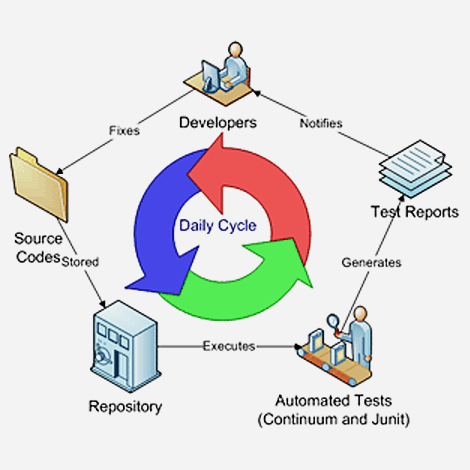
After setting up Continuum, I find it reasonably good to support continuous integration (for a free/open-source solution).The package for download is ready to run and easy to configure. This supports Agile development, quick-turn around. Initially, I was skeptic setting up this tool considering it may take me 3-5 days to setup. Well, I was wrong… I was able to get it up and running in a few hours and most of the time was actually spent fixing my ant script.

Deploying Continuum is relatively easy, just extract the tar.gz or zip, and execute bin\run… Viola! You now have continuous integration. :) Well of course, this assumes you have the proper ant scripts and JUnit test codes to support it.

Let me outline the steps needed to implement continuous integration:

1.) Create your JUnit test. It is not much useful to setup continuous integration without unit test, part of the process is to ensure stable and working codes at any point in time (more or less) and the easiest way to achieve this is to run automated test scripts. So, create your unit test first.

2.) Setup your build scripts. The scripts will define the rules and parameters to be executed. You can create “build”, “deploy”, “run-test” scripts or whatever goal you desire to achieve. Personally, I find two main goals necessary - “build” and “run-test”. “build” script performs a clean build and creates the war file for deployment. This will be referenced for testing and promotions. “run-test” executes the unit test scripts so that you can schedule this in your CI tool.

3.) Check-in codes to repo. CI tools retrieve the files from some repository. In case of Continuum, it requires specific SCM URL format to retrieve the source codes for synchronization. This should be pretty simple task as most development environment have some form of repository (SVN, CVS, etc).

4.) Install Continuum. Extract the continuum package and execute the run batch file. You can access it at http:\\localhost:8080\continuum. Considering you have accomplished the tasks above appropriately, getting Continuum to run is quite straightforward as this tool already includes build-in web container(jetty) and database(hsql).

You can read more about continuous integration from Martin Fowler to decide whether this process is a good tool for you.